“What really matters are features and user experience, not the developer technologies used to make them.”–
Something you should always keep in mind!
“What really matters are features and user experience, not the developer technologies used to make them.”–
Something you should always keep in mind!

ABTests.com is the first website I see (and the only one so far), making it possible to display the password your are typing when registering a new account.
I was wondering when it’ll be the first time I’ll see this after reading Jacob Nielsen’s Stop Password Masking:
Usability suffers when users type in passwords and the only feedback they get is a row of bullets. Typically, masking passwords doesn’t even increase security, but it does cost you business due to login failures.
They use two input fields to do this - one of type=“password” and one of type=“text”. They hide/show them according to whether the checkbox it ticked or not:
<label for="id_password1">I want my password to be
    <input type="password" name="password1" id="id_password1" />
    <input type="text" class="" style="display: none;">
</label>
<input id="show-password" type="checkbox" class="show-password">
<label for="show-password" id="show-password-label">Show password</label>
Do you know of other websites that do this?

Personas are a powerful tool for helping you to better understand the needs of your users. In this comic, drawn exclusively for Think Vitamin, you’ll learn more about Personas and how they’ll revolutionize the way you design and build web sites.
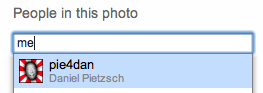
I like that you can type ‘me’ in the text field when adding yourself to a photo on Flickr, using their new People in Photos feature.
“There’s a common attribute that makes for good designers, good engineers, good employees, and good companies. For a long time, I couldn’t figure out what it was. Was it practice? Was it skill? Was it innate ability? Turns out, it’s none of those. It’s taste.”– Dustin Curtis
“The dirty little secret about simple: It’s actually hard to do. That’s why most people make complex stuff. Simple requires deep thought, discipline, and patience[…]”– How Chipotle, Pinkberry, and others win big by doing just a few things well - (37signals)
“Any fool can write code that a computer can understand. Good programmers write code that humans can understand.”– Martin Fowler, “Refactoring: Improving the Design of Existing Code”
Last weekend, I tried out an iPod touch for the first time - and had one of those (rare) moments when software makes me smile…
One of the things I wanted try was the software keyboard. So I went to Twitter and produced a short tweet.
While typing, I quickly noticed that there’s no dot (.) amongst the visible keys. “Well”, I thought, “they wouldn’t have just forgotten such an important sign!” And: “The most straight forward thing would be to hit ’Space’ twice for a dot…”
And Boom! There was a dot. Great! :-)
“– Paul Graham in Taste for Makers (via Harry Brignull)It seems strange to have to emphasize simplicity. You’d think simple would be the default. Ornate is more work. But something seems to come over people when they try to be creative. Beginning writers adopt a pompous tone that doesn’t sound anything like the way they speak. Designers trying to be artistic resort to swooshes and curlicues. Painters discover that they’re expressionists. It’s all evasion. Underneath the long words or the “expressive” brush strokes, there is not much going on, and that’s frightening.
When you’re forced to be simple, you’re forced to face the real problem. When you can’t deliver ornament, you have to deliver substance.
”
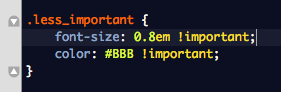
Less important is more important!?
I had to smile when I wrote this. :-)

Very cool. Google has made a comic book to explain their open sourced Chromium OS.
I think the book is more about the browser than the OS, but it’s a great read anyway.
I especially like the chapter about Search and User Experience (of course).
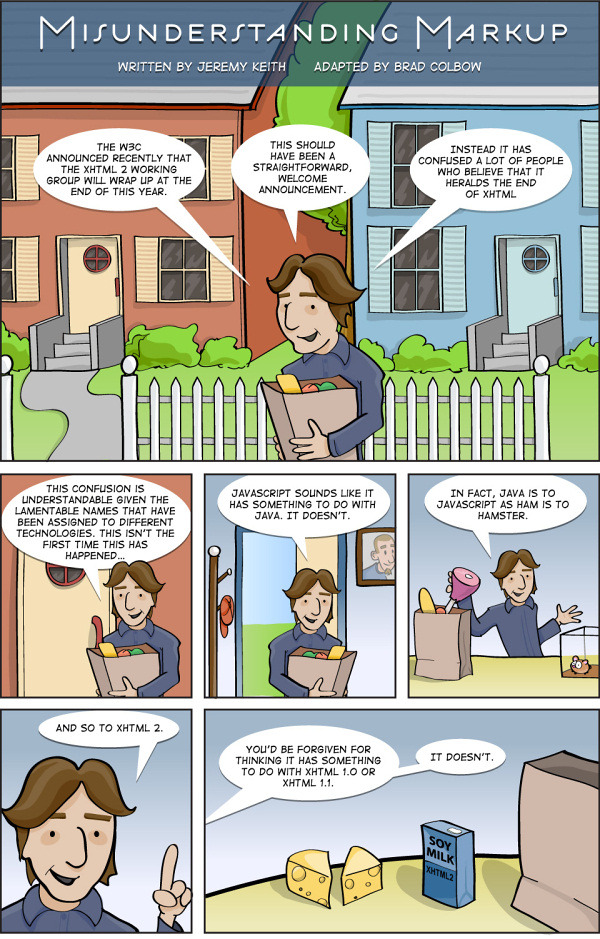
Misunderstanding Markup: XHTML 2/HTML 5 Comic Strip
Since the official announcement of W3C to stop working on the development of XHTML 2 in the end of 2009 and increase resources on HTML 5 instead, there has been a lot of confusion and various debates about the “proper”markup language for modern and future web-development. With XHTML 1.0, XHTML 2, HTML 4, HTML 5 and XHTML 5 we have so many languages that it’s really getting hard to keep track!
Another comic explaining technology. I like comics like these. They often give a simple, focused and therefor easy to understand introduction on a topic. It’s not just for kids, you know. ;-)
Be sure to click through to see the whole comic!
nikf:
Pixar Short “Lifted” - as seen prior to Ratatouille.
The UI designer of that panel is definitely not a genius! ;-)
Here are some interesting survey results. “What other languages are Ruby developers familiar with? How do they code? What tools do they use?”
These and more questions have been answered by more than 1000 participants.
Below, you can read a summary of the results and/or visit the individual result pages which include all the details (what I recommend):
Here is an excerpt from the original post by thoughtbot-giantrobots summarizing the results:
Thanks to the 1000+ developers who participated in our ruby community survey a few weeks back.
Here are the results as we head into 2010.
There are result reports linked to from within each section, and this post does not comprehensively list all the results, so click through if you’re interested.
Demographics
The demographics results show that PHP (36%) and Java (22%) are the dominant “prior languages” of many ruby developers. Notably, we left out Python. Sorry python folks.
We also see that more than half the people who took the survey work on ruby professionally on a small team.
Textmate (51%) wins the editor battle, with vim (21%) in second place - and “Distributed VCS” (git, hg, etc) dominates (83%) the version control section. I’m sure that credit and thanks are due to the github team for building a product which makes using a great VCS tool even better.
Formatting
The results show that in regard to an 80 character line limit, the “modern displays are wide enough to not enforce a limit” position wins out, though not with a majority. The questions about keyword spacing, and blank lines are fairly evenly split. A solid 75% of people always use parentheses on method definition — maybe enough to justify criticizing people who don’t?
Style
The results (part 1, part 2) show a strong preference for “self.method_name” over “class « self” for class method definitions and for only using exceptions in exceptional situations.
Database
The results show that a slight majority prefer to disallow null in boolean columns — but most are willing to allow NULL in Integer and String columns. Results are split on adding indexing “only when performance issue” vs proactively adding them to foreign key columns ahead of time.
Views and Rails
The results that many people use a shared folder for “global partials”, and show little consensus on how/where to send email from. I think this question got the most “other” replies — let us know how else you’re sending email in the comments.
Documentation
The results show that ruby programmers prefer meaningful variable names, and only like to document code when it’s complex and needs explanation. Almost 80% have committed a code change which effects only code formatting and not functionality.
Wrapup
Maybe most encouragingly, when asked about whether the types of questions in the survey mattered or were a huge waste of time, nearly 90% chose the “I think it’s worth caring about your craft, and these questions are professionally relevant” option. From our experience at conferences and user group events, that seems consistent with the commitment to quality and best practices that exists in the ruby community.
“–”
- In fact, as far as I can tell the “desktop OS” is basically a failure. Outside of computer professionals and “graphic designers,” most people just want to start their web browser. They can barely use the rest of their operating system past that — and they don’t want or need to, either.
- So building computers that are designed to do one thing, run a web browser, incredibly, and do it insanely well, is a great idea.
Whisky Van Gogh Go: why ChromeOS is a great idea
I believe there are millions of users out there that have a personal computer and only use it for doing stuff on the internet. And even if they do something else, using a classic desktop application - like writing the occasional letter in MS Word f.e. - there is already a web application for this. These users don’t need an expensive, full-featured computer with lots of storage and processing power to accomplish their tasks.